Reasoning and speed
The model picker can expose extra controls for reasoning effort and speed. These controls are specific to the selected provider and model. A missing selector usually means the model has not advertised that capability.
Choose a reasoning effort
- Open the model picker in the conversation composer.
- Select the provider and model you want to use.
- If a reasoning-effort row appears, select one of its available levels.
- Send your next message with that configuration.
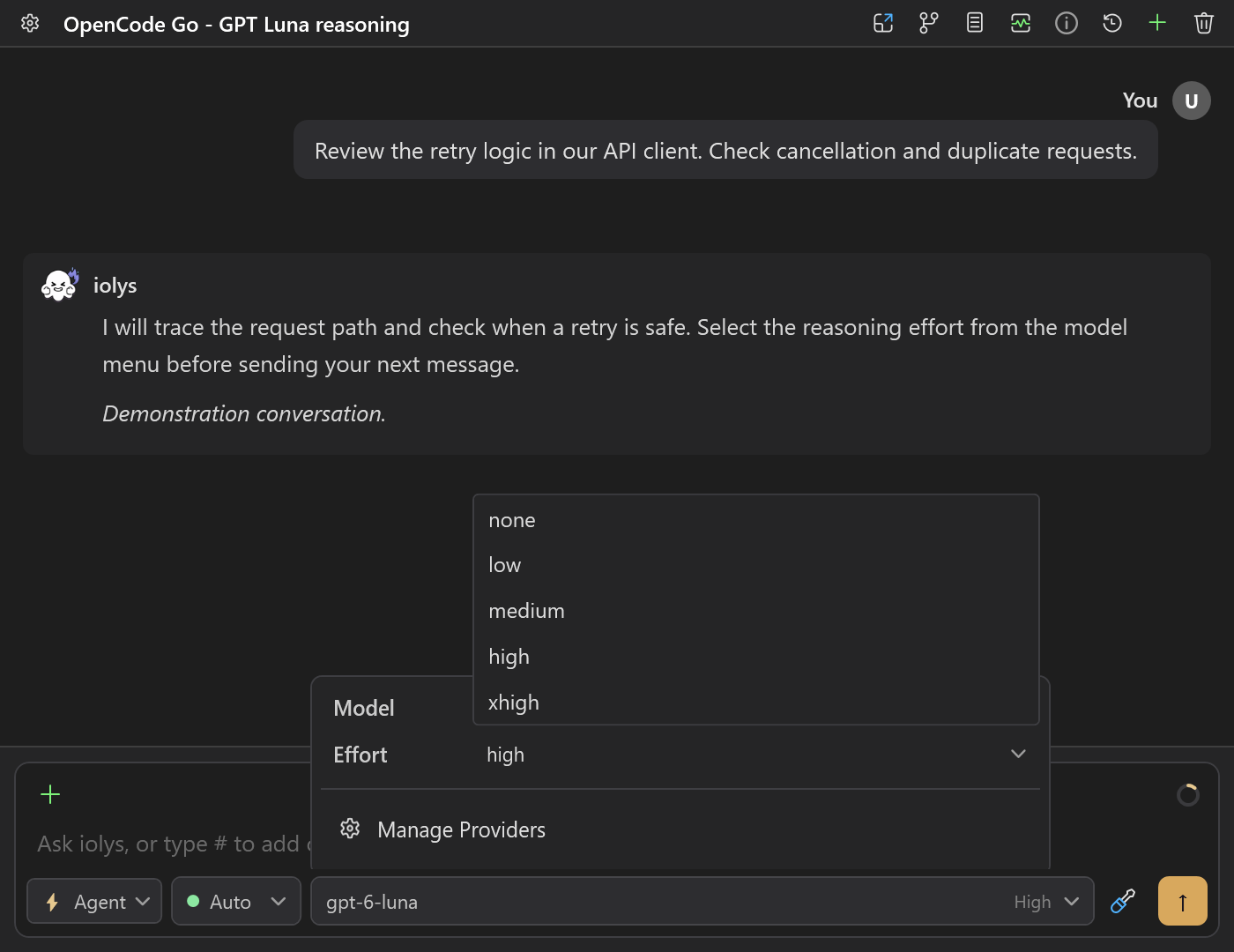
Example effort selector for an OpenCode Go model. Demonstration choices illustrate the control; other models can offer different levels.
Use the provider's default while learning how a model behaves. A higher effort can help with a difficult investigation, but may increase response time and token use. Effort names are provider settings, not a comparable measure of quality across different models.
The selection belongs to the conversation. When switching to a model without effort options, iolys clears or ignores an incompatible previous selection instead of sending an unsupported value.
Availability by provider
| Provider | How effort is offered |
|---|---|
| Claude Code | Available controls depend on the managed CLI and selected model. |
| Codex | The CLI advertises supported effort levels for each model. |
| Kimi | Uses the model catalog and the CLI's current configuration options. An on/off thinking control is different from graded effort. |
| Kiro | Discovers the model's effort options through the CLI. Discovery can finish after the model list first appears. |
| Anthropic API | Sends effort only when supported by the selected model. |
| DeepSeek | Offers the effort choices supported by the current integration's catalog. |
| OpenRouter | Uses reasoning metadata from its model catalog; not all models offer a selector. |
| OpenCode Go | Uses model-specific effort options. |
| Databricks | Depends on the endpoint's model profile and transport. |
The generic OpenAI-compatible integration, Google, Groq, NVIDIA NIM, and Ollama do not expose this shared effort control in the current implementation. Reasoning text may still be displayed where a provider supplies it; that does not imply a configurable effort level.
Select a speed tier
When a provider advertises accelerated service tiers, the composer offers a speed choice. Codex reads these choices from its CLI model catalog.
New conversations start on standard service. An accelerated tier is an explicit session choice; it does not become the default for all provider connections. Availability, usage rules, and billing depend on your provider account.

Codex Fast selected independently of reasoning effort. This release screenshot illustrates the controls, not current model availability.
If the provider rejects the requested tier, the turn fails and iolys resets the next turn to standard. It does not automatically replay a turn that might already have performed actions. Read the error, review any completed work, and retry deliberately.
Resolve missing or rejected options
- No effort selector: choose a model that reports effort support. Do not assume support from its name alone.
- Kiro options appear late: reopen the composer configuration after model discovery finishes.
- Kimi reports incompatible levels: update the managed CLI and refresh the model catalog.
- An old conversation rejects a choice: select a currently advertised value, or return to the default.
- An accelerated tier is rejected: check the provider's account eligibility and use standard service for the next attempt.
See Usage and costs to interpret the resulting token, quota, and cost information.