Troubleshooting
Start with the message shown in Chat or the provider configuration window. It helps distinguish a local connection problem from a provider, model, permission, or workspace issue.
Chat is missing or an update is required
After installing iolys, restart Visual Studio, open a solution, and select View > Iolys Chat. Check that the extension was installed into the Visual Studio instance you are using.
If Chat displays Update required, choose Update iolys, complete the extension update, then close and restart Visual Studio. See Installation for the supported environment and Marketplace link.
The local server is reconnecting
iolys attempts to reconnect after a local-server interruption. Allow the reconnect state to complete and use Retry now if offered.
If the server was stopped from the Windows notification area, Chat identifies that state and offers Restart server. If startup continues to fail, restart Visual Studio and note the exact error before seeking support.
Reconnection and provider sign-in are separate. Repeatedly changing API credentials will not resolve a local-server startup failure.
No models appear, or authentication fails
Open Settings > Manage Providers or Manage Models in the model picker.
- Check that the intended provider is configured and connected.
- For a CLI provider, verify its installation, update it when offered, and complete sign-in.
- For an API, check the endpoint and credentials in the configuration window.
- For Ollama, confirm the configured instance is running and the requested model is available.
- Return to the model picker and wait for discovery to finish.
Use the matching provider guide for route-specific steps. Account eligibility, quota exhaustion, and model access are handled by the provider. Never include an API key or authentication token in a support message.
A capability or tool is unavailable
Vision, reasoning effort, speed tiers, web tools, and usage reporting vary by model and provider. Check the current model, its advertised capabilities, and your tool selection.
If the agent can inspect files but cannot edit, check Plan mode and permissions. Also check the custom agent's tool allowlist and any MCP execution policy. Increasing permissions will not add a capability that the selected provider does not support.
For a rejected image, choose a model with image support and check the context guide. If Selection is unavailable, select code in an editor; Active document requires an open code document.
A parallel workspace cannot be created or removed
Confirm that Git is available and the solution is in a repository. A branch name must be valid and cannot already be checked out in another worktree.
For removal, return to another workspace and use Refresh. The current and main worktrees are protected, and ordinary removal requires verified clean local state. Preserve uncommitted changes before cleaning up. See Work in parallel.
Send a diagnostic report
Open the affected conversation and submit:
/send_diagnostics
You can also select Send diagnostics in Session statistics. The report card lets you add an optional description, choose Send diagnostics or Send without a message, or cancel. An autocomplete suggestion only inserts the command; it does not submit a report.
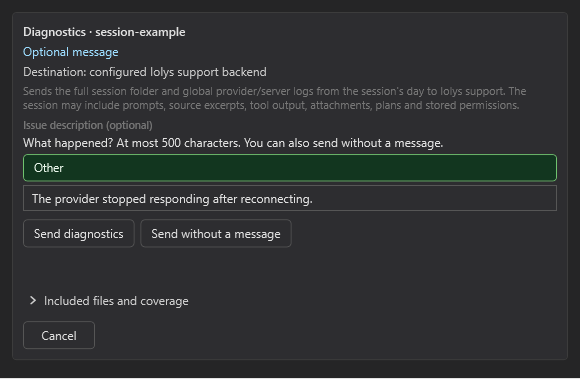
Existing product-UI preview with example session data. Inspect Included files and coverage before submitting.
Review Included files and coverage before sending. The archive contains the captured session, including conversation text, persisted attachments, plans, permission decisions, and tool output, plus selected diagnostic logs. Session content can include source code or other sensitive material. This is an explicit support upload, not automatic reporting. See Data and privacy for the distinction between session reports and automatic usage analytics.
Only a confirmed submission shows Sent and a copyable support code. If offered, Retry / check submission checks or retries the same report. Cancel cannot retract data already accepted by support, and Dismiss only closes the card.
Share the support code and a short description through the iolys Discord community. Include the provider, model, observed error, and the steps that reproduce it.